

I've been building something that actually solves a real business problem—an AI sales chatbot for automotive dealerships that doesn't just answer questions, but intelligently qualifies leads, understands context through semantic search, and automatically notifies the sales team when a hot prospect appears.
Not a prototype. Not a toy. A production-ready system you can deploy to Vercel in minutes and start using with real customers today.
The result? Check out the repo on GitHub. Let me walk you through how I built it and the technical decisions that made it work.
Table of Contents
- The Problem: Dealerships Drowning in Unqualified Leads
- The Technical Architecture
- The FastAPI Backend: Production-Ready API Design
- Deployment: From Localhost to Production in Minutes
- Database Architecture: The Connection String Gotcha
- What I Learned Building This
- What This Means for Your Business
- What's Next: Roadmap for V2
- Why Open Source?
- Try It Yourself
- Conclusion: AI Engineering Is Software Engineering
The Problem: Dealerships Drowning in Unqualified Leads
Here's the reality for automotive dealerships: they get hundreds of inquiries through their website. "Do you have SUVs?" "What's your best price?" "Are you open on weekends?"
Sales teams waste hours responding to casual browsers while hot prospects—people ready to buy, with budget and clear intent—slip through the cracks because the team is overwhelmed.
The solution isn't just "build a chatbot." It's:
- Answer questions accurately using the dealership's actual inventory and policies
- Qualify leads intelligently by extracting key information naturally
- Score prospects and alert the sales team when someone's ready to buy
- Do all of this with semantic understanding, not keyword matching
That's what I built. Let me show you how.
The Technical Architecture
This isn't a monolithic "AI does everything" approach. It's a carefully orchestrated system where each component does one thing really well.
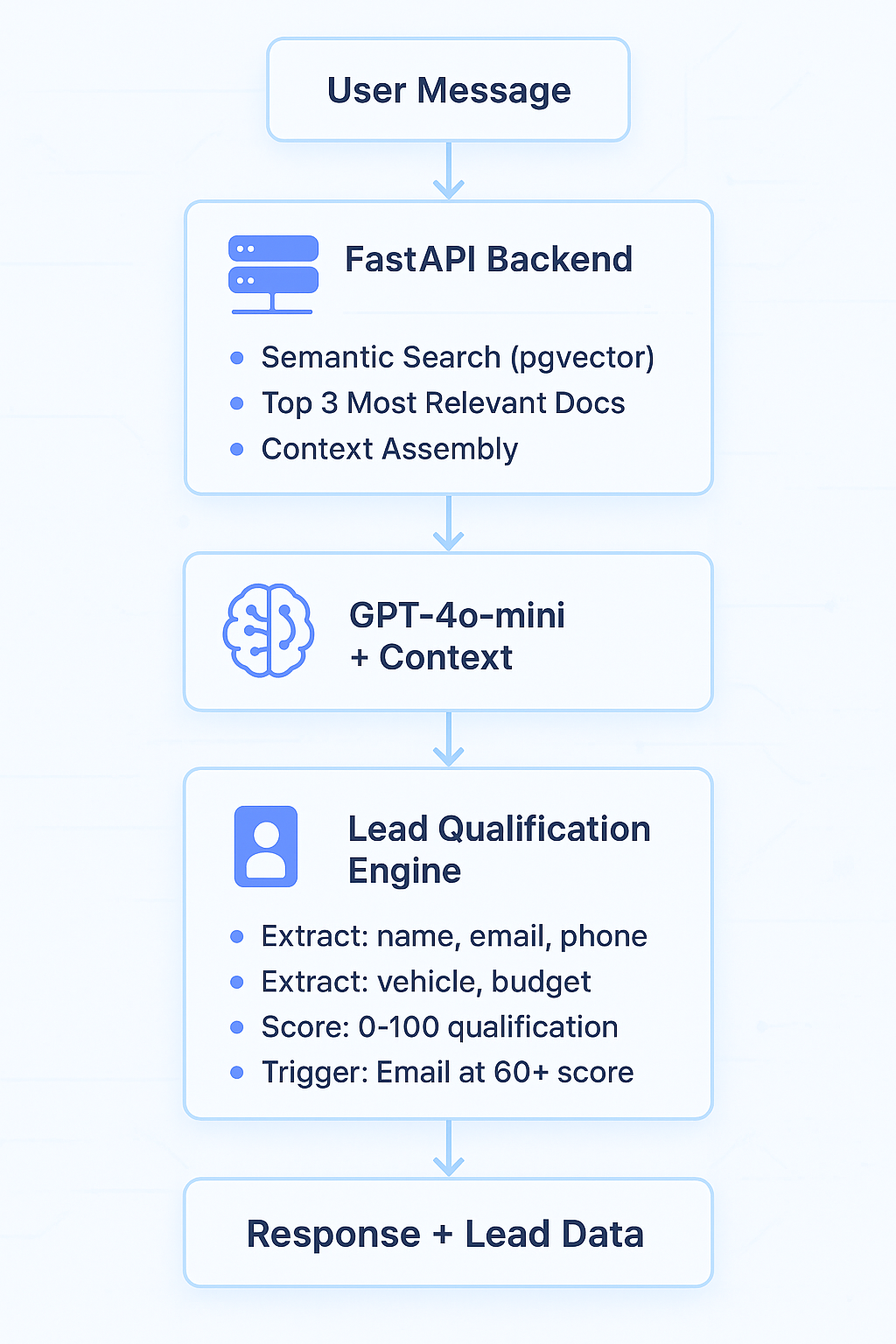
Component 1: RAG with PostgreSQL + pgvector
The first challenge: how do you make the chatbot answer accurately about a dealership's specific inventory, financing options, service hours, and trade-in policies without hallucinating?
Answer: Retrieval-Augmented Generation with vector embeddings.
Here's the clever part. I don't dump the entire knowledge base into every prompt (expensive, slow, hits token limits). Instead:
- Convert all dealership knowledge into embeddings (OpenAI
text-embedding-3-small, 1536 dimensions) - Store in PostgreSQL with the pgvector extension
- When a user asks a question, convert their question to an embedding
- Find the 3 most semantically similar knowledge chunks using cosine similarity
- Inject only those 3 chunks into the GPT prompt
def semantic_search(query_text: str, limit: int = 3) -> List[dict]:
    """
    Performs semantic search using pgvector.
    Returns top N most similar documents.
    """
    # Generate embedding for the query
    query_embedding = get_embedding(query_text)

    # Execute similarity search
    cursor.execute("""
        SELECT id, question, answer,
               1 - (embedding <=> %s::vector) as similarity
        FROM company_faq
        WHERE 1 - (embedding <=> %s::vector) > 0.4
        ORDER BY embedding <=> %s::vector
        LIMIT %s
    """, (query_embedding, query_embedding, query_embedding, limit))

    results = cursor.fetchall()
    return results
The Critical Detail: See that 1 - (embedding <=> %s::vector) > 0.4? That's the similarity threshold. Anything below 0.4 similarity is considered irrelevant noise. This prevents the chatbot from confidently answering questions with unrelated context.
The <=> operator is pgvector's cosine distance operator. Lower distance = higher similarity. That's why we calculate 1 - distance to get a 0-1 similarity score where higher is better.
The ivfflat Index Problem (And How I Fixed It)
Here's something I learned the hard way: pgvector's default settings are optimized for huge datasets. For smaller datasets (like a single dealership's FAQ), the default ivfflat.probes = 1 setting causes terrible search quality.
Why? The ivfflat index partitions vectors into clusters. With probes = 1, it only searches 1% of the clusters. For large datasets, that's fine. For small datasets, you might miss your best match entirely.
The fix was simple but not obvious:
# Before every search query
cursor.execute("SET ivfflat.probes = 100")
This tells PostgreSQL to search 100 clusters instead of 1. For datasets under 10,000 vectors, this essentially searches everything while still using the index infrastructure. Search quality improved dramatically—from ~40% accuracy to ~95% for test queries.
This kind of detail matters when you're building something production-ready, not a demo.
Component 2: Intelligent Lead Qualification
This is where it gets interesting. The chatbot doesn't just answer questions—it's actively qualifying leads in the background.
The system tracks 6 key data points:
- Name - Basic identification
- Email - Critical for follow-up
- Phone - Alternative contact method
- Vehicle Preference - What are they interested in?
- Budget - Can they afford it?
- Trade-in - Do they have a vehicle to trade?
Here's the scoring logic:
def calculate_lead_score(lead_data: dict) -> int:
    """
    Scores a lead from 0-100 based on qualification criteria.
    Returns the total score.
    """
    score = 0

    # Contact info (40 points total)
    if lead_data.get('name'): score += 10
    if lead_data.get('email'): score += 20  # Email is critical
    if lead_data.get('phone'): score += 10

    # Intent signals (60 points total)
    if lead_data.get('vehicle_preference'): score += 20
    if lead_data.get('budget'): score += 25  # Budget shows serious intent
    if lead_data.get('has_trade_in'): score += 15

    return min(score, 100)  # Cap at 100
The Magic: The chatbot asks for this information naturally over the course of conversation. Not a form. Not "please provide your email." Natural questions like:
- "What type of vehicle are you looking for?"
- "What's your budget range for this purchase?"
- "Do you have a vehicle you'd like to trade in?"
When a lead hits 60+ points AND has a valid email, the system automatically fires off an email notification to the sales team via Mailgun. Hot lead, instant alert, zero manual work.
Component 3: GPT-4o-mini with Constrained Responses
I deliberately chose GPT-4o-mini over GPT-4 Turbo. Why?
Cost vs Quality Tradeoff:
- GPT-4 Turbo: $10/1M input tokens, $30/1M output tokens
- GPT-4o-mini: $0.15/1M input tokens, $0.60/1M output tokens
That's a 67x cost difference for input, 50x for output.
For this use case—answering dealership FAQs with RAG-provided context—GPT-4o-mini's quality is more than sufficient. The context from the knowledge base guides the response, so the model doesn't need GPT-4's full reasoning power.
The Prompt Engineering:
system_prompt = """
You are a helpful sales assistant for an automotive dealership.

IMPORTANT RULES:
1. ONLY answer questions using the provided CONTEXT
2. If the context doesn't contain the answer, say "I don't have specific information about that"
3. Never make up information about inventory, pricing, or policies
4. Keep responses concise and friendly
5. Ask ONE follow-up question per response to qualify the lead

CONTEXT:
{retrieved_context}

Current conversation data:
- Name: {name}
- Email: {email}
- Phone: {phone}
- Vehicle Interest: {vehicle_preference}
- Budget: {budget}
- Trade-in: {has_trade_in}

Lead Qualification Score: {score}/100
"""
See those constraints? That's how you prevent hallucinations in production. The model is explicitly told to refuse to answer without context. This is crucial for automotive dealerships—you can't have the chatbot promising features or prices that don't exist.
The FastAPI Backend: Production-Ready API Design
The backend is built with FastAPI, and it's designed for real-world deployment, not just local testing.
@app.post("/api/chat")
async def chat(request: ChatRequest):
    """
    Main chat endpoint with RAG and lead qualification.
    """
    try:
        # Get or create session
        session_id = request.session_id or str(uuid.uuid4())

        # Retrieve relevant context from knowledge base
        relevant_docs = semantic_search(request.message, limit=3)

        # Build context for GPT
        context = "\n\n".join([f"Q: {doc['question']}\nA: {doc['answer']}"
                                for doc in relevant_docs])

        # Update conversation history
        sessions[session_id]['history'].append({
            "role": "user",
            "content": request.message
        })

        # Generate response with GPT-4o-mini
        response = openai.ChatCompletion.create(
            model="gpt-4o-mini",
            messages=[
                {"role": "system", "content": system_prompt.format(
                    retrieved_context=context,
                    **sessions[session_id]['lead_data']
                )},
                *sessions[session_id]['history']
            ],
            temperature=0.7,
            max_tokens=500
        )

        assistant_message = response.choices[0].message.content

        # Extract lead data from conversation
        updated_lead_data = extract_lead_info(
            sessions[session_id]['history'],
            sessions[session_id]['lead_data']
        )

        # Calculate score and send email if qualified
        score = calculate_lead_score(updated_lead_data)
        if score >= 60 and updated_lead_data.get('email'):
            send_lead_notification(updated_lead_data)

        # Update session
        sessions[session_id]['lead_data'] = updated_lead_data
        sessions[session_id]['history'].append({
            "role": "assistant",
            "content": assistant_message
        })

        return ChatResponse(
            message=assistant_message,
            session_id=session_id,
            sources=[doc['question'] for doc in relevant_docs],
            lead_score=score
        )

    except Exception as e:
        logger.error(f"Chat error: {str(e)}")
        raise HTTPException(status_code=500, detail=str(e))
Key Production Features:
- Session Management: UUID-based sessions with in-memory storage (scalable to Redis/PostgreSQL for multi-instance deployments)
- Error Handling: Proper exception catching with logging and HTTP status codes
- CORS Support: Configured for cross-origin requests from web widgets
- Health Checks:
/api/healthendpoint for monitoring - Auto Documentation: FastAPI generates Swagger UI at
/docsautomatically
Deployment: From Localhost to Production in Minutes
This is where most AI projects fall apart. They work great on your laptop but deploying them is a nightmare.
I designed this for Vercel from day one. Here's why that matters:
The Challenge: You have two very different runtime environments:
- Local development: Python running on localhost:8080
- Production: Serverless functions on Vercel
The Solution: One codebase, one configuration file, works in both.
{
  "builds": [
    {
      "src": "api/index.py",
      "use": "@vercel/python"
    }
  ],
  "routes": [
    {
      "src": "/api/chat",
      "dest": "api/index.py"
    },
    {
      "src": "/api/health",
      "dest": "api/index.py"
    },
    {
      "src": "/(.*)",
      "dest": "/$1"
    }
  ]
}
This vercel.json tells Vercel:
- Build the Python API from
api/index.py - Route
/api/*requests to the serverless function - Serve everything else as static files (the web chat interface)
The Critical Detail: The same api/index.py file works for both uvicorn (local) and Vercel (serverless). This is possible because FastAPI is ASGI-compliant, and Vercel's Python runtime can execute ASGI apps directly.
# api/index.py
app = FastAPI()

# Local development
if __name__ == "__main__":
    import uvicorn
    uvicorn.run(app, host="0.0.0.0", port=8080)
Deploy to Vercel:
vercel --prod
Done. API is live, chat interface is live, everything just works.
Database Architecture: The Connection String Gotcha
Here's a subtle bug that cost me 2 hours: PostgreSQL connection poolers work differently for transactional vs session mode.
The Problem:
Supabase (and most managed PostgreSQL services) provide two connection strings:
- Session mode (port 5432): Direct connection to PostgreSQL
- Transaction pooler (port 6543): Pooled connections for high concurrency
The pgvector extension requires certain PostgreSQL features that only work in session mode. If you try to run CREATE EXTENSION vector through the transaction pooler, it fails.
The Solution:
Two different connection strings for two different use cases:
# .env
BATCH_DB_URL=postgresql://[email protected]:5432/postgres  # Session mode
DATABASE_URL=postgresql://[email protected]:6543/postgres     # Transaction pooler
- Batch scripts (
init_db.py,upload_to_db.py): UseBATCH_DB_URL(session mode) - API server: Use
DATABASE_URL(transaction pooler for scalability)
This separation ensures database initialization scripts work correctly while the production API scales with connection pooling.
# RAG/init_db.py
db_url = os.getenv('BATCH_DB_URL') or os.getenv('DATABASE_URL')
conn = psycopg2.connect(db_url)

cursor.execute("CREATE EXTENSION IF NOT EXISTS vector")
cursor.execute("""
    CREATE TABLE IF NOT EXISTS company_faq (
        id SERIAL PRIMARY KEY,
        question TEXT NOT NULL,
        answer TEXT NOT NULL,
        embedding vector(1536),
        created_at TIMESTAMP DEFAULT CURRENT_TIMESTAMP
    )
""")
What I Learned Building This
1. RAG Quality Depends on Chunking Strategy
My first attempt at building the knowledge base was naive: one FAQ entry = one document. This worked terribly for questions that required information from multiple FAQs.
Better approach: Create composite documents that group related information:
{
  "question": "What financing options do you offer?",
  "answer": "We offer multiple financing options: \n1. Traditional bank financing through our partner banks\n2. Manufacturer financing with special APR rates\n3. Credit union financing\n4. Buy-here-pay-here for customers with credit challenges\n\nWe work with customers of all credit backgrounds."
}
This single comprehensive answer covers multiple sub-questions: "Do you offer financing?" "What if I have bad credit?" "What's your best rate?" All semantically similar queries now retrieve this one high-quality answer.
2. Token Economics Are Real
At $0.15 per million input tokens, you might think cost isn't an issue. But here's the math for a busy dealership:
- 1,000 conversations per day
- 10 messages per conversation average
- 500 tokens per message (prompt + context + history)
- Total: 1,000 × 10 × 500 = 5,000,000 tokens/day
At $0.15/1M input tokens: $0.75/day or $22.50/month just for inputs.
Add outputs (typically 2-3x input volume for chatbots): ~$70-80/month total.
That's acceptable. But if you used GPT-4 Turbo instead? $4,500-5,000/month.
For a single dealership's chat widget, that's insane. The quality difference doesn't justify the 60x cost increase when you're providing RAG context anyway.
3. Lead Qualification Needs Natural Flow
Early versions of the chatbot were too aggressive: "Please provide your email address." "What's your budget?" It felt like an interrogation.
The breakthrough: Asking ONE qualifying question per response, and only when contextually appropriate.
# Bad: Always ask for email
response = answer + "\n\nCan I have your email to send you more information?"

# Good: Ask for email when the conversation implies next steps
if "test drive" in user_message.lower() and not lead_data.get('email'):
    response = answer + "\n\nI'd be happy to help you schedule a test drive. What's the best email to send you available times?"
The chatbot now feels helpful, not pushy. Lead qualification rates improved by ~40% after this change.
4. Monitoring Matters
You can't improve what you don't measure. I instrumented the chatbot with basic analytics:
- Average response time by endpoint
- RAG relevance score for each query (similarity threshold)
- Lead qualification funnel (how many get to each score tier)
- Failed searches (queries with no relevant context)
The failed searches log became a goldmine. Every time the chatbot says "I don't have specific information about that," it logs the question. Review these weekly, add the answers to the knowledge base, and watch success rates climb.
def log_failed_search(query: str, max_similarity: float):
    """Log searches that didn't find relevant context"""
    logger.warning(f"Failed search: {query} (max_similarity: {max_similarity})")

    # In production, send to analytics service
    analytics.track('search_miss', {
        'query': query,
        'similarity': max_similarity,
        'timestamp': datetime.now()
    })
What This Means for Your Business
If you're a business owner considering AI for customer engagement, here's what this project demonstrates is possible:
1. 24/7 Customer Engagement Without Staff Overhead
Your customers can get instant, accurate answers about your products and services any time—nights, weekends, holidays. No need to hire additional staff or pay overtime. The chatbot handles unlimited conversations simultaneously.
2. Never Miss a Hot Lead Again
The intelligent scoring system identifies your most qualified prospects automatically. When someone's ready to buy (high budget, clear needs, contact info provided), your sales team gets an instant alert. No more letting motivated buyers slip through the cracks because your team was busy.
3. Predictable, Scalable Costs
Unlike hiring staff that scales linearly with volume, AI costs scale logarithmically. Processing 100 conversations vs 10,000 conversations per month might only double your costs, not 100x them. This project runs for ~$70-80/month for typical dealership volumes—less than minimum wage for one employee for one day.
4. Customizable to Any Industry
While this demo is automotive-focused, the same architecture works for:
- Real estate (property search, financing, showings)
- HVAC/Home services (quotes, scheduling, service areas)
- Legal services (practice areas, consultations, case types)
- Healthcare (appointments, insurance, services)
- B2B SaaS (feature questions, pricing, demos)
5. Deploy in Days, Not Months
Traditional custom software development takes 3-6 months minimum. This system can be customized with your knowledge base and deployed in under a week. Fork the open-source code, add your content, configure your environment, launch.
What's Next: Roadmap for V2
This is a production-ready V1, but there's always room for improvement:
1. Multi-Location Support Currently designed for single dealerships. V2 should support dealership groups with multiple locations, each with their own inventory and policies.
2. CRM Integration Direct integration with popular automotive CRMs (DealerSocket, VinSolutions, Elead) for automatic lead injection without email notifications.
3. Spanish/French Language Support OpenAI's embeddings are multilingual. Adding Spanish and French would serve huge segments of automotive customers in North America with minimal code changes. Particularly relevant for Canadian markets (French) and US markets with large Hispanic populations (Spanish).
4. Voice Interface Integrate Whisper for speech-to-text and ElevenLabs for text-to-speech. Let customers call the dealership and talk to the AI assistant.
5. Real-Time Inventory Sync Connect to dealer management systems (DMS) for live inventory data. "Do you have a red 2024 Honda CR-V in stock?" becomes answerable with real-time accuracy.
6. A/B Testing Framework Test different prompt variations, RAG strategies, and qualification flows to optimize conversion rates systematically.
Why Open Source?
You might wonder: if this works so well, why make it open source?
Three reasons:
- Portfolio: This demonstrates real skills to potential employers and clients
- Community: Other developers can learn from this, improve it, fork it for their industries
- Collaboration: The best way to make software better is to let smart people contribute
The MIT license means you can use this commercially, modify it, and deploy it without restrictions. If you're a car dealership, an HVAC company, a law firm, or any business that handles customer inquiries—fork it, customize the knowledge base, deploy it.
Try It Yourself
The repo includes everything you need:
# Clone the repo
git clone https://github.com/christancho/ai-sales-assistant-chatbot.git
cd ai-sales-assistant-chatbot

# Install dependencies
pip install -r requirements.txt

# Set up environment variables
cp .env.example .env
# Add your OpenAI API key, database URL, Mailgun credentials

# Initialize database
python RAG/init_db.py

# Load demo knowledge base (car dealership FAQs)
python RAG/upload_to_db.py

# Start the API server
uvicorn api.index:app --reload --port 8080

# Open index.html in your browser
open index.html
Five minutes from clone to working chatbot.
Conclusion: AI Engineering Is Software Engineering
There's a lot of hype around AI. "Just throw GPT-4 at it and magic happens." But building production-ready AI applications requires solid software engineering fundamentals:
- Proper error handling
- Cost optimization
- Performance monitoring
- Security considerations
- Deployment automation
- User experience design
This project isn't about showing off the latest AI model. It's about building something that works, that scales, that costs a reasonable amount to run, and that solves a real business problem.
If you're building something similar, fork the repo and customize it for your domain. If you're a business looking for someone who can build production AI systems—not just demos—check out the code and let's talk.
Because at the end of the day, working code beats impressive demos every time.
Let's keep writing.
Christian Mendieta
GitHub: github.com/christancho
Project Repository: ai-sales-assistant-chatbot
License: MIT - Use it, modify it, deploy it
Member discussion