

Introduction
You've just deployed your first multi-agent system to production. It worked beautifully in development—your agents collaborated seamlessly, tasks completed in the right order, and everything felt elegant. Then, at 3 AM, something goes wrong. An agent makes an unexpected decision. A workflow enters an infinite loop. You try to debug the issue, but the framework's abstraction layers obscure what's actually happening. You're staring at logs that tell you that something failed, but not why.
This scenario has become increasingly common as organizations move beyond proof-of-concepts with CrewAI and discover that production-grade agent systems demand something fundamentally different: visibility, control, and determinism.
The shift from CrewAI to LangGraph isn't about one framework being objectively "better"—it's about recognizing a critical inflection point. CrewAI excels at rapid prototyping with its intuitive role-based model and high-level abstractions. But those same abstractions that make development delightful become operational liabilities when you need to monitor, debug, and maintain agents handling real user data.
By the end of this article, you'll understand the architectural differences that make LangGraph superior for production systems, how state management and explicit graph structures solve the non-deterministic nightmare of multi-agent loops, and whether this migration makes sense for your specific use case. You'll also learn practical strategies for evaluating whether to stick with CrewAI or make the move to LangGraph.
The Abstraction Trap: Why CrewAI's Strengths Become Weaknesses in Production
The Seductive Power of High-Level Abstractions
CrewAI's appeal is undeniable. Define a few roles, describe some tasks, and you have a functioning multi-agent system. The framework handles orchestration, tool management, and agent communication behind the scenes. For a proof-of-concept, this is genuinely powerful—you can validate whether multi-agent systems solve your problem without wrestling with low-level implementation details.
The framework's design philosophy centers on making agents feel like team members with specific roles and responsibilities. A researcher agent gathers information. An analyst agent processes it. A writer agent produces the output. This mental model is intuitive, especially for business stakeholders. It's why CrewAI has gained such rapid adoption in the industry.
But here's the problem: this abstraction creates a black box.
When you define a task as "Analyze the data and provide recommendations," CrewAI's internal orchestration logic determines what happens next. The agent receives the task, potentially loops back to ask clarifying questions, might invoke tools, could request help from other agents, and eventually produces output. Each of these steps is hidden behind the framework's abstraction layers. You can see the input and output, but the reasoning path—the actual execution flow—remains opaque.
The Black Box Problem in Production
In development, this opacity doesn't matter much. Your agents are working with toy data. If something goes wrong, you can restart and try again. But production is different. When an agent makes a mistake with real customer data, you need to understand exactly what happened and why.
Consider a customer support automation system built with CrewAI. A support agent misclassifies a high-priority issue as low-priority, causing a critical customer problem to be delayed. You need to investigate:
- What information did the agent receive?
- Which tools did it invoke?
- What was the reasoning process?
- Where did the classification go wrong?
With CrewAI, you can see the final output and the tools that were called. But the intermediate reasoning—the actual decision-making process—is largely inaccessible. The framework's orchestration logic is internal and difficult to inspect. You're forced to add extensive logging at the agent level, which is time-consuming and often incomplete.
This is where LangGraph's architecture provides a fundamental advantage. In LangGraph, every step is an explicit node in a graph. Every decision point is a conditional edge. Every state transition is visible. When something goes wrong, you can trace exactly which node executed, what state it received, what state it produced, and why it took that particular path.
Why Abstraction Fails at Scale
The abstraction problem compounds as system complexity increases. With CrewAI, you might have:
- 5-10 agents working together
- Complex conditional logic determining which agent handles which task
- Retry logic when agents fail
- Fallback mechanisms when primary approaches don't work
At this scale, CrewAI's abstraction becomes a liability. You can't easily express complex conditional logic that depends on runtime state. You can't cleanly implement error recovery strategies. You can't visualize the actual execution paths your system takes.
LangGraph's explicit state graph model handles this elegantly. Every possible path through your system is defined explicitly. Conditional logic is clear and testable. Error handling is explicit. State transitions are visible.
This isn't just a debugging advantage—it's a reliability advantage. Systems you can see and understand are systems you can trust.
State Machines vs. Conversational Loops: The Architecture That Matters
The Determinism Problem
Here's a question that cuts to the heart of the CrewAI vs. LangGraph decision: Can you reproduce the exact same behavior twice with the same inputs?
With CrewAI, the answer is often "not reliably." The framework's orchestration logic is designed to be flexible and conversational. Agents can ask clarifying questions. They can decide to invoke tools. They can request help from other agents. This flexibility is valuable during development, but it creates a non-deterministic system where the same input might produce different execution paths on different runs.
This might seem like a minor issue, but it's actually critical for production systems. Here's why:
Testing becomes unreliable. You test your system with a particular input and it works. You deploy it to production. The same input produces a different result because the agent took a different reasoning path.
Debugging becomes a nightmare. When something goes wrong in production, you want to reproduce the issue locally. But if your system is non-deterministic, reproduction is difficult or impossible.
Compliance becomes problematic. In regulated industries (finance, healthcare, legal), you need to be able to audit and explain every decision. Non-deterministic behavior makes this nearly impossible.
Scaling becomes risky. As you add more agents and more complex interactions, the number of possible execution paths explodes. You can't test them all. You can't predict what will happen.
How State Machines Solve Non-Determinism
LangGraph's state machine architecture solves this by making every possible path explicit. Instead of agents having conversational flexibility, you define:
- Nodes: Discrete computational steps (an agent invokes tools, processes information, makes a decision)
- Edges: Transitions between nodes (conditional logic determining which node executes next)
- State: The data structure that flows through the graph (what information is available at each step)
Here's a concrete example: a code generation system.
With CrewAI, you might define:
- A "Coder" agent that writes code
- A "Tester" agent that tests code
- A "Reviewer" agent that checks for best practices
The agents collaborate through conversation. The coder writes code, the tester tests it, and if it fails, the tester might ask the coder to fix it. But how many times will this loop? When will it stop? The framework handles this through conversational logic, which is flexible but non-deterministic.
With LangGraph, you define:
Node A (Coder) -> Node B (Tester) -> Conditional Edge
-> If tests pass: Node C (Deploy)
The execution path is explicit. The loop is controlled. You can specify maximum iterations. You can track state at each step. You can reproduce the exact same behavior every time.
Looping Without Spiraling
One of the most common issues with CrewAI in production is infinite or near-infinite conversational loops. Two agents start discussing something, and they keep refining their response to each other. The conversation is productive in some sense, but it never terminates. You're burning tokens and time without making progress.
This happens because CrewAI's orchestration logic is fundamentally conversational. Agents are designed to collaborate through dialogue. There's no hard mechanism to prevent loops—just heuristics hoping the agents will eventually converge.
LangGraph prevents this through explicit state management and edge conditions. You define exactly when a loop should terminate. You can set maximum iterations. You can implement sophisticated termination logic based on state.
For example, in a code generation loop:
Maximum iterations: 5
Termination condition: Tests pass OR max iterations reached
The agent can learn from previous attempts because the state explicitly carries that history. Each iteration has access to what was tried before. This enables genuine improvement, not just repetition.
Production Readiness: Observability, Monitoring, and Debugging
Why Production Systems Need Visibility
Let me be direct: if you can't see what your agent is doing, you can't trust it in production.
This isn't a nice-to-have. It's a fundamental requirement. When an agent handles customer data, makes business decisions, or interacts with critical systems, you need complete visibility into its behavior. You need to know:
- What state did it receive?
- What reasoning did it perform?
- What tools did it invoke?
- What state did it produce?
- Why did it take that particular path?
CrewAI's high-level abstractions make this visibility difficult. The framework logs agent activity at a high level—"Agent X completed Task Y"—but the intermediate steps are opaque. You can add custom logging, but you're working against the framework's design rather than with it.
Graph Visualization and State Inspection
LangGraph's architecture enables powerful observability tools. Because every node and edge is explicit, the framework can:
Visualize the execution graph: See exactly which nodes executed and in what order. This is invaluable for debugging—you can literally see the path your system took.
Inspect state at each step: See what data was available at each node and what each node produced. This enables deep understanding of why decisions were made.
Track state history: Keep a complete record of how state evolved throughout execution. This is essential for auditing and compliance.
Integrate with monitoring tools: Because the graph structure is explicit, LangGraph integrates seamlessly with observability platforms like LangSmith. You get production-grade monitoring without additional effort.
Consider debugging a customer support automation system:
With CrewAI: You see that a support ticket was misclassified. You review the agent logs. The logs show the ticket was received and classified as "low priority." But why? What reasoning led to that decision? You don't know. The framework's abstraction hides the intermediate steps.
With LangGraph: You see the same misclassification. You inspect the graph visualization. You see exactly which node made the classification decision. You inspect that node's state. You see the information it received and the reasoning it performed. You can immediately identify the issue—perhaps the agent didn't receive certain context, or the classification logic was flawed.
Debugging in Production
Here's where the difference becomes visceral. It's 2 AM. Your production system is behaving unexpectedly. You need to figure out what's wrong, and you need to do it fast.
With CrewAI: You're digging through logs, trying to understand what happened. The framework's abstraction layers obscure the actual execution flow. You're making educated guesses about what went wrong. You might add more logging, but that requires code changes and redeployment.
With LangGraph: You can inspect the execution graph directly. You can see exactly which node executed, what state it received, and what it produced. You can understand the problem immediately. In many cases, you can even replay the exact execution to reproduce the issue locally.
This isn't just faster—it's the difference between being able to solve production problems and being unable to solve them.
Real-World Migration Scenarios and When to Make the Move
The Prototyping vs. Production Inflection Point
Most teams don't start with LangGraph. They start with CrewAI because it's faster to prototype with. The question is: when should you migrate?
The answer isn't "always migrate." It's "migrate when your requirements change from rapid prototyping to production reliability."
You should stick with CrewAI if:
- You're building a proof-of-concept or internal tool
- Your system doesn't need to handle real customer data
- Deterministic behavior isn't critical
- You value rapid development over operational visibility
- Your agent interactions are relatively simple
You should migrate to LangGraph if:
- You're moving to production with real customer data
- You need deterministic, reproducible behavior
- Observability and debugging are critical
- Your agent interactions are complex or involve loops
- You need compliance and auditability
- You're operating at scale with high reliability requirements
Case Study: Customer Support Automation
A SaaS company built a customer support automation system with CrewAI. In development, it worked beautifully. Support agents would triage tickets, research issues, and draft responses. The system reduced support load by 40%.
Then they moved to production. Several issues emerged:
Issue 1: Unpredictable behavior. The same ticket would sometimes be handled differently on different runs. Sometimes the system would invoke tools in a particular order; other times it would invoke them differently. Support quality was inconsistent.
Issue 2: Infinite loops. Occasionally, two agents would get into discussion loops. The system would burn tokens without making progress. They had to manually intervene.
Issue 3: Debugging nightmare. When something went wrong, they couldn't figure out why. The logs showed high-level activity but not the reasoning that led to decisions. Troubleshooting took hours.
Issue 4: Compliance problems. Their legal team required the ability to audit every decision. CrewAI's abstraction made this nearly impossible.
The company migrated to LangGraph. The migration took 3 weeks. The results:
- Deterministic behavior: The same ticket always produces the same result. Quality is consistent.
- No infinite loops: Explicit graph structure with termination conditions prevents loops.
- Easy debugging: They can inspect the execution graph and understand exactly what happened.
- Compliance ready: Every decision is auditable and reproducible.
Was the 3-week migration effort worth it? Absolutely. The operational burden reduction in production justified it 10x over.
Case Study: Data Processing Pipeline
A data analytics company built a system to process and analyze large datasets. The system would extract data, clean it, analyze it, and generate reports. CrewAI seemed like a good fit—they could define agents for each step.
In production, they discovered that CrewAI's lack of native support for complex loops made it difficult to implement iterative processing. Data cleaning often required multiple passes. Error handling was fragile. Performance was poor because the framework added overhead at each step.
They migrated to LangGraph. The graph-based architecture made it trivial to express iterative processing. Conditional edges allowed sophisticated error handling. Performance improved because there was less abstraction overhead. State management made it easy to track data provenance—where each piece of data came from and what transformations it underwent.
Case Study: Financial Compliance System
A fintech company built a system to monitor trading activity for compliance violations. The system needed to be absolutely deterministic and fully auditable. CrewAI wasn't even considered—the compliance requirements made it clear that only an explicit, auditable system would work.
They built with LangGraph from the start. Every decision was explicit. Every state transition was logged. Every execution was reproducible. The system could be audited by regulators with complete confidence.
Best Practices for the Migration and Beyond
Planning Your Migration
If you decide to migrate from CrewAI to LangGraph, here's a structured approach:
Phase 1: Understand your current system
- Document every agent, task, and workflow
- Identify the execution paths and decision points
- Understand the state that flows through your system
- Identify pain points (infinite loops, non-determinism, debugging difficulty)
Phase 2: Design your LangGraph system
- Map agents to nodes
- Identify decision points and implement them as conditional edges
- Define your state schema explicitly
- Plan how state will flow through the graph
Phase 3: Implement incrementally
- Start with the most critical workflows
- Implement them in LangGraph
- Test thoroughly
- Run both systems in parallel to validate behavior
- Gradually migrate remaining workflows
Phase 4: Optimize and monitor
- Profile performance
- Optimize nodes that are bottlenecks
- Set up comprehensive monitoring
- Establish alerting for production issues
State Schema Design
One of the most important decisions in a LangGraph system is how you structure your state. This is where many migrations stumble.
Your state should be:
- Explicit: Every piece of information that flows through your graph should be in the state schema
- Versioned: As your system evolves, you'll need to handle state schema changes
- Auditable: State should provide a complete record of what happened
- Efficient: State should contain only what's necessary; avoid bloating it with unnecessary data
Here's an example state schema for a customer support system:
class SupportState(TypedDict):
ticket_id: str
ticket_content: str
classification: str
research_results: str
draft_response: str
review_feedback: str
final_response: str
execution_path: list[str]  # Track which nodes executed
Notice that this schema includes executionpath and iterationcount. These are crucial for observability and debugging. They let you understand what happened.
Error Handling and Resilience
LangGraph's explicit structure makes error handling more straightforward than CrewAI.
Define error handling at the node level: Each node should handle its own errors and communicate them through state.
Use conditional edges for recovery: Implement recovery logic as conditional edges. If a node fails, route to a recovery node.
Implement retry logic explicitly: Don't rely on agent "conversation" to handle retries. Define retry logic as explicit graph structure.
Track failure context: When something fails, capture why in the state. This enables intelligent recovery.
Example:
def handleclassificationerror(state):
if state["classification_attempts"] < 3:
return "classify_ticket"  # Retry

else:
return "escalatetohuman"  # Give up and escalate
This is explicit, testable, and reliable.
Monitoring and Observability
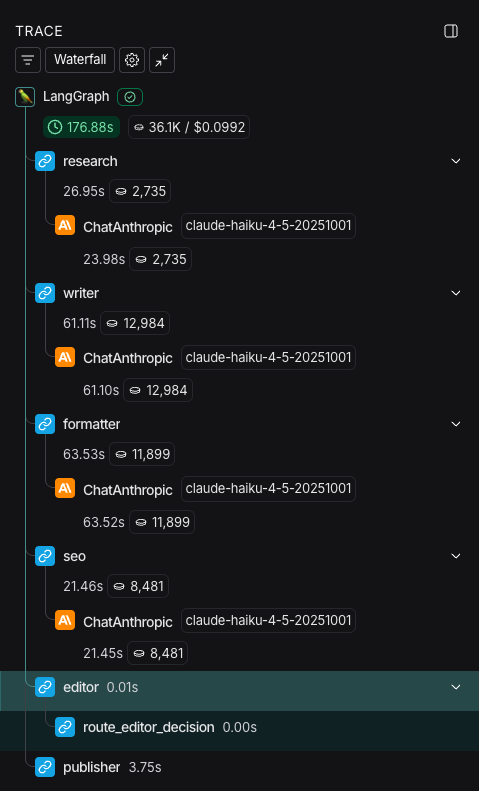
LangGraph integrates with LangSmith for production monitoring. Set this up from day one.
Track execution metrics:
- How many nodes execute per request?
- How long does each node take?
- What's the distribution of execution paths?
Monitor state size: Large state can indicate problems. Track state size over time.
Alert on anomalies: Set up alerts for unexpected behavior—infinite loops, unusual execution paths, performance degradation.
Log everything: Every state transition, every node execution, every decision. You'll be grateful when debugging production issues.
Addressing the Counterarguments
"But CrewAI is Easier to Use"
This is true. CrewAI is easier to use initially. You can build something working in hours instead of days. But "easier to use" and "easier to operate in production" are different things. The question is: what's the total cost of ownership?
If you're building a toy project, CrewAI's ease of use is valuable. If you're building a production system, the operational burden of CrewAI's abstraction often outweighs the initial development speed advantage.
"CrewAI is Improving Rapidly"
Also true. The CrewAI team has been adding features and improving the framework. But some limitations are architectural, not just implementation details. The black-box nature of orchestration is baked into CrewAI's design philosophy. You can't really fix that without redesigning the framework fundamentally.
"LangGraph is Too Verbose"
LangGraph requires more code upfront. You have to define every node and edge explicitly. But this verbosity is a feature, not a bug. Explicit is better than implicit. The code tells you exactly what the system does. In production, this clarity is invaluable.
The Future of Agent Frameworks
The industry is moving toward explicit, graph-based agent architectures. This isn't a coincidence. As agent systems move from research projects to production systems, the need for transparency and control becomes paramount.
We're seeing this trend across the industry:
- LangGraph pioneered the graph-based approach and continues to lead in production deployments
- CrewAI is adding Flows, a new feature for more explicit orchestration, acknowledging the need for better control
- Emerging frameworks are being built with graph-based architecture from the start
The lesson is clear: abstractions that work for prototyping don't work for production. As your system matures, you need more control and visibility.
---
Conclusion
The decision to move from CrewAI to LangGraph isn't about one framework being objectively better. It's about recognizing that the requirements of production systems are fundamentally different from the requirements of proof-of-concepts.
CrewAI excels at rapid prototyping. Its high-level abstractions let you build multi-agent systems quickly. But those same abstractions become liabilities when you need to debug production issues, ensure deterministic behavior, implement complex error handling, or satisfy compliance requirements.
Here are the three key takeaways:
- Abstraction is a tradeoff: CrewAI's abstractions make development fast but create a black box that's difficult to debug and operate in production. LangGraph's explicit graph structure requires more code upfront but provides the visibility and control production systems demand.
- State machines solve non-determinism: LangGraph's explicit state graph architecture makes agent behavior deterministic and reproducible. This is critical for testing, debugging, compliance, and scaling. CrewAI's conversational orchestration is flexible but non-deterministic.
- Production readiness isn't an afterthought: Systems that are easy to debug, monitor, and understand are systems you can trust in production. LangGraph's architecture enables this from day one. Retrofitting observability onto CrewAI is difficult.
What You Should Do Next
If you're building a prototype or proof-of-concept: Start with CrewAI. The rapid development speed is valuable. You'll learn whether multi-agent systems solve your problem without investing heavily in infrastructure.
If you're moving a system to production: Plan a migration to LangGraph. Yes, it requires effort. But the operational burden reduction is worth it. Start with your most critical workflows and migrate incrementally.
If you're building a production system from scratch: Consider starting with LangGraph. The initial development is slower, but you'll avoid the pain of retrofitting observability and control later.
Right now, take one action: If you have a CrewAI system in production that's causing operational pain, spend an hour documenting the pain points. Use that as your business case for migration. The effort to migrate is typically 2-4 weeks for moderate complexity systems. The operational burden reduction over the system's lifetime is worth 10x that effort.
The future belongs to agent systems that are transparent, controllable, and observable. LangGraph's architecture is designed for exactly that future. As you build your agentic systems, choose the framework that lets you see, understand, and control what your agents are doing. In production, that choice matters more than anything else.
Christian
Member discussion